Type:Rider, a classic platforming game with an original and beautiful style, is on sale for $.99 to celebrate it’s first anniversary.
Personally, I think this is one of the most interesting platforming games on the App Store. It combines a beautiful visual aesthetic with solid level design and gameplay – all prerequisites for a good platformer – but it’s best feature has nothing to do with gameplay.
Gorgeous, original graphics
Typography is a fascinating subject. We stare at words and letters all day long, but few of us know the details behind the differences in the fonts we see. But there is a rich, detailed story behind every font we read – fonts have goals, they are designed to convey emotions – and we experience the results of that work every time we read text.
Type:Rider aims to educate about typography. It’s levels are themed around specific fonts. Throughout the course of a level, you’ll collect that font’s alphabet, as well as special characters. Doing so unlocks short “history pages” that explore the backstory behind the font. This is all presented tastefully, and in an understated and optional manner. Type:Rider is definitely NOT an “educational game” in the traditional sense, but I learned a lot from it, and more importantly, it makes the subject it explores interesting.
A rare beast: a legitimately fun way to learn
While Type:Rider is certainly a good platformer on it’s own, it’s combination of a beautiful silhouetted aesthetic with a legitimately interesting typographic theme is what really pushes it over the top. Controller support is solid, with support for both Standard and Extended layout controllers.
If you’re at all interested in typography, you need to own this. And if you’re a fan of platforming games, you might just come away from this with an expanded appreciation for the words you see around you. At $.99, this one is a steal.
GBA4iOS developer Riley Testut digs into some of the details about the methods GBA4iOS uses to work without jailbreaking today, and how security changes in the forthcoming iOS 8.1 update will break those methods. Definitely worth a read.
This is likely going to be a tough one for AfterPad visitors who want to run GBA games. On the one hand, iOS 8.1 hopefully will fix the bluetooth MFi controller connection issues that plague owners of the SteelSeries Stratus and Moga Rebel (wired controllers are unaffected) who are using iOS 8. On the other hand, GBA4iOS will likely be unusable until another major hack is discovered, or until iOS 8 versions are jailbroken.
My game uses both the connect and discount notifications along with the list of connected controllers. A single player game can just assume that the controller they want to reference is the first in the list but I need to show which player colour will represent which controller.
I was seeing that for each controller there were 2 players listed, this meant a single player game was impossible. I kept thinking it was an issue that would be resolved in the next beta so I did not look in to the cause or submit a Radar (Apples version of bug submission).
[…]
I had a few goes at disconnecting and reconnecting my MFi controller and eventually the app crashed. I hooked it up to Xcode to check the device logs and saw it crashed when trying to query the controllers property of âisAttachedToDeviceâ. This will return true for the case type controllers and false for Bluetooth controllers. Itâs useful to know this as you could rely on touch screen buttons also if you know they are near the device. I tried calling this code on my phantom forwarded controllers and rather than fail gracefully or report false it instead crashed, just like the Game Controller Tester. Sometimes the forwarded controller connects first, sometimes the real controller does.
This is something, I think, Apple are expecting developers to work around. Controller forwarding is a new feature and we will need to update our apps to support this.
If you’re a developer, you need to read the whole piece. It gets into some of the nitty gritty details about what could be causing the issue, and provides a work-around solution for fixing it.
Myself, I still have some questions about why this problem is occurring in the first place. This seems like a pretty serious bug on Apple’s end, not a deliberate change in how controller support works.
Controllers SHOULD show up as forwarded when they’re being forwarded from an iPhone to an iPad. When they’re not, they should show up exactly the same as they did in iOS7. Thats what I took away from watching Apple’s keynote on game controllers at this year’s WWDC. I have no idea why Bluetooth controllers are showing up twice, but I’d be shocked it if was an intentional change. If it WAS an intentional change, I have no idea why Bluetooth controllers are behaving any differently from Lightning controllers.
Anyways, this article provides a great workaround for developers, and is well worth a read. A patch for Aztec Antics that incorporates this workaround has already been submitted, and should be available soon.
Hot on the heels of the recent MOGA Rebel MFi controller release, high-end gaming accessory maker Mad Catz has finally begun taking preorders for their own full Bluetooth MFi controller, the C.T.R.L.i, for an early October release, at a price of $59!
The C.T.R.L.i is a long-anticipated entry to the market, and seems likely to be the second full-size Bluetooth MFi controller available. Similarly to the MOGA Rebel, this is a full size console-style controller with an Xbox style staggered joystick layout, fully analog buttons and triggers, and wireless Bluetooth connectivity.
Similar to the MOGA Rebel, the Mad Catz C.T.R.L.i includes a mounting solution for an iPhone, this time in the form of a sturdy-feeling grip that screws security in to the back of the controller. The grip should be large enough to support the new iPhone 6 designs, including the 5.5 inch iPhone 6 Plus. Unlike the Rebel, the C.T.R.L.i does NOT include a rechargeable battery, and instead relies on non-Apple-standard AAA batteries.
I happen to own the PC equivalent of this controller, the C.T.R.L.r, and while this iOS version will be different is several key ways, I can confirm that the build quality of the controller is outstanding. Absolutely first-rate, up to the caliber of the last generation first-party console controllers. Unfortunately, the buttons, d-pad, and analog sticks are another story, and all have serious problems. However, as these have all been completely replaced for this iOS version, I’m withholding judgement until I can get access to the real C.T.R.L.i – you can expect a review as soon as possible, as well as a full comparison to the MOGA Rebel.
Sadly, Mad Catz seems to have picked a bad time to release the C.T.R.L.i, coming right on the heels of an iOS update that kills Bluetooth MFi compatibility with a large amount of games that were previously compatible under iOS7. With any luck, Apple will fix this issue before the C.T.R.L.i ships in October. The other benefit to waiting is that you’ll have access to the alternate controller colors, rather than being stuck with black, which is the only option you can preorder.
Sadly, the full color range is not currently available – hope you like black
At $59, this Mad Catz controller undercuts all of it’s competitors. If Mad Catz can keep the build quality up here, there is a very good chance that this will wind up being the best MFi controller available this year. I’m looking forward to getting my hands on one and writing a review.
Customers in the United States and Canada can pre-order from the American Mad Catz store. European customers can order from the European Mad Catz store. Presumably, the C.T.R.L.i will find its way into Apple Stores before long.
The much-anticipated Moga Rebel – the first full-size bluetooth MFi controller – is now available online from Apple, after being available for the past week in-store.
I’ll have a full review of the Rebel coming shortly, but suffice it to say, this controller works, feels reasonably comfortable, and (most important) is the only traditional-style bluetooth controller available right now.
The Rebel has one significant downside, though, and that downside is iOS8. Apple’s latest system seriously damaged MFi controller support across the board for bluetooth controllers, with about half of all tested games no longer being compatible with the Moga Rebel or SteelSeries Stratus.
If you’re interested in the Moga Rebel, and if you’re running iOS7, you should absolutely consider picking one up today. If, however, you’re running iOS 8, it might be worth a wait – the list of iOS8 bluetooth compatible games might end up being a lot smaller than you’re hoping.
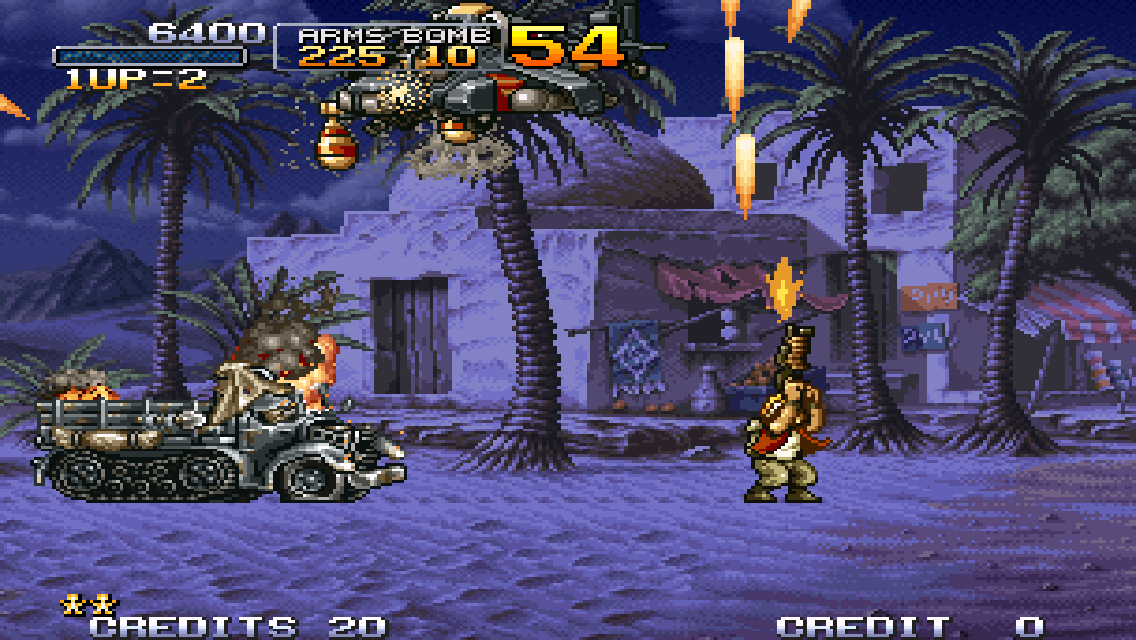
Good news, classic arcade game fans: the entire Metal Slug series now supports MFi controllers on iOS!
While Metal Slug 2 and Metal Slug 3 previously supported MFi controller input, the other games in the series did not. Thankfully, SNK Playmore and Dotemu just fixed fixed that.
Classic arcade gameplay and some truly stunning pixel art
Unfortunately, these games aren’t playable with Bluetooth controllers on iOS8, due to the previously documented bug (seriously hoping for a fix from Apple on that). But all gamers on iOS7, and gamers with the Moga Ace Power and Logitech PowerShell on iOS8, will definitely want to give this one a look.
After further testing, many of the games marked as compatible on this list still exhibit problems on weaker devices, and in low memory situations. Take this list as a rough guide, rather than a definitive compatibility guarantee. This is an inherent problem with Bluetooth on iOS 8, and every game is affected.
The good news is, the 8.1.1 firmware update fixes these problems almost entirely for owners of the SteelSeries Stratus controllers. Owners of the MOGA Rebel are still likely to experience disconnects, however.
As previously mentioned, and subsequently covered on TouchArcade, iOS8 doesn’t play nice with wireless MFi controllers. Some games work perfectly, while others exhibit serious flaws that cause the controllers to lag and drop their connections.
The following is an attempt to catalog the games that are confirmed working, and the games that are confirmed not working, as tested with the Moga Rebel on a Retina iPad Mini
I doubt I’ll be able to test every game (I certainly hope Apple fixes the problem before it reaches that point), but I hope to put together at least a selection of some of the most popular games, confirmed either to be compatible or broken. If you’re on iOS 8, and you either have a SteelSeries Stratus or a Moga Rebel, you should bookmark this page. It will be frequently updated.
Lastly, I’d like to remind everyone that these issues do not exist on iOS7, and do not exist with Lightning-connected MFi controllers like the Logitech PowerShell, Moga Ace Power, and Razer Junglecat. This only affects bluetooth controllers in iOS8 – Namely, the SteelSeries Stratus and Moga Rebel controllers.
This is a warning for iOS gamers with the SteelSeries Stratus or MOGA Rebel controllers: DO NOT upgrade to iOS 8. Under iOS 8, there are significant, widespread compatibility issues with all wireless MFi controllers.
When playing an affected game, the MFi controller will start to lag its inputs. Within a short time, the controller will disconnect, then reconnect, but still lag, then disconnect, over and over again. The only way to fix it is to un-pair, turn off, turn on, then re-pair the MFi controller.
This is most prevalent with the MOGA Rebel controller, though still noticeable with the SteelSeries Stratus.
Many thanks to MFi4Gamerz and sideburns4life for being able to help confirm this issue on Twitter.
A list of games that trigger this issue, as well as games that are confirmed safe, will be compiled soon. If anyone out there has experienced similar issues (or haven’t – that would be useful too!) please get in touch. Hopefully, a fix will be available from Apple soon.
How some behind-the-scenes changes to AirPlay turned the Apple TV into a real game console
If you’re as serious about iOS gaming as I am, chances are you’ve been eagerly awaiting the day Apple releases a high-end Apple TV with an App Store full of games and an official game controller. Due to a variety of factors, mostly related to content deals with cable companies, Apple has thus far been unwilling to release such an Apple TV (they like to make a big splash with the product, and that requires both gaming and television content – can’t do one at a time).
Such an Apple TV product is definitely on the horizon, with various well-connected members of the Apple community mentioning that A-list Apple engineers are hard at work on such a device. However, until such a device is formally released, Apple has pushed users towards a stop-gap solution in the form of a technology called AirPlay.
While this stopgap had issues in the past, Apple has made some serious improvements in iOS 8 that turn AirPlay based gaming into a compelling experience. Read on to learn how.
The History of AirPlay
AirPlay is a brand name that encompasses multiple video output technologies, but the important one to discuss here is one called AirPlay Mirroring. In effect, AirPlay Mirroring beams the contents of your iPhone or iPad’s screen on to your TV. When combined with an MFi controller, this allows you to play iOS games the big screen, without needing to ever take your eyes off the TV and touch your device.
Theoretically, AirPlay Mirroring offers a great solution to people wanting an Apple TV game console. Unfortunately, the reality has been far less pretty. The actual mechanics of beaming a 1-megapixel image from one device to another over Wifi, 60 times per second (iOS and most TVs run at 60fps), without compressing the image until it’s illegible, and without a perceptible delay, has been too tall an order for Apple in the past.
In iOS 7 and below, AirPlay Mirroring runs at a maximum of 30fps, resulting in a somewhat jerky picture. Even being able to do that required significant video compression, resulting in a big-screen picture that often looked like a low-resolution YouTube upload. Unfortunately, this compression also requires a significant amount of processing on the device itself, which results in a noticeable delay between what happens on the iPhone’s screen, and the amount of time it takes to compress, beam, and display the video on the Apple TV – some games are rendered almost unplayable on the TV, since this lag simply doesn’t provide enough time for you to react to the picture you’re seeing. While some games manage to play great in spite of these limitations, for the vast majority, AirPlay has simply not been good enough. But that’s about to change, in a big way.
Enter iOS 8 – AirPlay Reborn
There’s no two ways about this: the difference between iOS 7 AirPlay and iOS 8 Airplay is night and day. In iOS 8, Apple has somehow managed to dramatically improve every single aspect of AirPlay Mirroring. It is a stark, immediately obvious contrast.
First of all, iOS 8 broadcasts AirPlay at a consistent 60 frames per second in compatible apps (more on that later). This means that Apple is shooting a 1-megapixel picture from your device to your Apple TV 60 times per second – twice as much as under iOS 7.
But that’s not all. Apple didn’t just double the framerate, they also dramatically enhanced the quality of the video output. In iOS 7, AirPlay output a relatively hightly compressed video that showed obvious compression artifacts in basically every scenario. It was playable, but certainly noticable. In iOS 8, the compression used is much more intelligent – video quality is dramatically better when less motion is occurring on screen and against simpler backgrounds, and against more complex scenes, the compression occurs less perceptibly. In retro-style games with limited on-screen activity, compression is basically imperceptible. In more complex 3D games, compression exists, but manages to look FAR better than under iOS 7. GTA: San Andreas, for example, looked better being broadcast from my iPhone than it ever did on my PS2.
Complex video compression with a high degree of quality generally comes with a big cost: latency. Without getting into too much detail about the nature of video compression, having a compressor that can see “into the future” can give you dramatically better results. Basically, what that boils down to is, the video being broadcast is always a few frames behind, in order to give the compressor the ability to analyze those frames and create a more fluid picture. The issue for gaming is, if you get too many frames behind, the player starts to notice a delay between their actions and what happens on the screen. This is called input lag. A certain amount of input lag is a part of every TV, but AirPlay video piled a good deal more on top of the amount the TV already had, to the point that many games were unplayable.
In iOS 7, this input lag was very noticeable. Holding your iPhone up to the TV, it was easy to see that the iPhone was displaying a picture almost half a second ahead of the TV. In iOS 8, despite major improvements to video quality, the lag has been reduced. Not eliminated entirely, mind you – such a thing would be impossible – but reduced to the point that a great many games are now playable that weren’t before. This is perhaps the biggest improvement iOS 8 brings. There is a lot further to go before every game is playable comfortably, but the work Apple has done in iOS 8 is commendable.
Unfortunately, iOS 8 brings one pretty major AirPlay flaw that iOS 7 didn’t have, and that serves to make certain games unplayable.
A Stutter Away from Perfection
As great as iOS 8’s AirPlay fundamentals are, one somewhat nasty issue made it into the GM. In certain games, the AirPlay picture exhibits a noticeable stutter every second or so. This basically freezes the picture on screen for 5 frames or so, then throws all those frames up at once. Games with this flaw are generally unplayable, and even after closing the game, the lag remains for a minute or two, before generally correcting itself, only to return if you launch another affected game.
Strangely enough, there is little rhyme or reason as to which games exhibit this flaw. Extremely graphically intense games like Dead Trigger 2 and GTA San Andreas have no flaw at all, whereas the relatively simple Sonic series stutters to the point of unplayability.
I’m still in the early phases of trying to nail down exactly what is causing this stutter issue, and I plan on experimenting with different network configurations and devices to try to determine whether those factors have any impact on it. I’ll update this post when I learn more about this issue, or if Apple manages to fix it with a subsequent update.
The Future
The good news about AirPlay is, it is a technology that can grow and improve along with the components of the iPhone / iPad and the Apple TV. Network technology in these devices today is limited to 802.11n – a fast standard, but one that does provide a bottleneck in maximum bitrate and range. The new iPhone 6 series is being upgraded to the much faster 802.11ac standard, and presumably updates aren’t too far behind for the iPad and the Apple TV.
In addition to wireless upgrades, improvements to the GPUs inside the iPhone and iPad can make a huge difference in broadcast quality. Current GPUs are restricted from working too hard on AirPlay, because if they draw too much power for broadcast, the performance of the game itself starts to suffer. Newer GPUs will include more cores which can be dedicated exclusively towards video processing, and take some of the load off the cores powering the games themselves.
The biggest potential for improvement is in the video encode itself. AirPlay today uses a video compression technology called H264 – a high quality, adaptable, industry-standard codec that can be found in everything from Blu-Rays to web video to teleconferencing. As well as h264 has served us up until today, the industry has been hard at work designing an upgraded codec called h265, which is capable of around 50% greater efficiency – meaning it can cram 50% more quality into the same amount of bandwidth as h264.
Enabling h265 over AirPlay will likely require a new Apple TV with an h265-capable GPU. The good news is, such a chip is easy to find – the A8 chip in Apple’s newly-announced iPhone 6 line is fully capable of encoding and decoding h265 video. When the A8 chip makes its way into the Apple TV, I fully expect an upgraded h265-encoded version of AirPlay will come along for the ride.
But thats all for the future. The fact of the matter is, even today, the vast majority of iOS games are playable on the Apple TV with iOS 8. Apple has done a massive amount of work on this front. The experience of using an iPhone in an MFi controller today, streaming to the Apple TV, is finally a good enough experience that I can recommend it wholeheartedly (at least once the stuttering bug is ironed out).
If you have an iPhone / iPad and an MFi controller, and you want to take your gaming to the TV, Apple finally has you covered with AirPlay and the Apple TV.
TouchArcade goes full hands-on with the Upcoming Moga Rebel controller, and provides a great video and some interesting impressions of using the controller.
Jared from TouchArcade says:
As you can see, the Rebel mostly resembles an Xbox controller, with its offset dual-analog sticks and button arrangement. In terms of build quality the Rebel feels quite solid, though it still doesn’t feel as solid as an actual 1st-party controller from an Xbox or PlayStation. It feels lighter than either of those, and has more of a plasticky feel, but it still feels like a well-built piece of equipment. The buttons have a nice clicky feel, and the L and R analog triggers feel especially good in terms of resistance and springiness. The two analog sticks also feel great, though they’re a bit looser than I prefer.
[…] Overall, my impressions after yesterday’s demo and my own time playing around with a review unit last night is that this is far and away the best full-sized MFi controller on market. Now, there’s not a ton of competition in that area, and there are a few negatives to the Rebel. Obviously pricing is an issue as it is with every MFi controller, and at $79.99, while the Rebel definitely does feel like a well-built piece of hardware, it still doesn’t feel like something that costs $79.99. Also, as much as I love the flip-out arm to hold my device, it doesn’t flip all the way back, and the angle at which it stops feels a bit too forward for my taste. That’s a very minor problem though, and one I’m quickly getting used to.
Lots to digest here. Seems like while the Rebel isn’t perfect, it should come the closest of any so far to fulfilling most people’s needs in an MFi controller.
Also noteworthy is the impressions of the Moga World App, which should be launching alongside the Rebel. The app provides a limited catalog of MFi controller compatible games, shows an overview of button layout and sensitivity, and should allow for firmware updates in the future to improve the Rebel controller.
Razer has done something similar for their upcoming Junglecat, with the notable addition of allowing for customizable button sensitivity. Here’s hoping MOGA incorporates something like that as well.
I’ll be posting my own impressions of the Rebel as soon the review unit gets here, and I’m planning on getting and exhaustive review up as soon as possible. Stay tuned.